#1 AI PDF Translator for Android

The AI PDF Translator That Keeps Your Formatting

Docuvey is the best AI PDF translator app — translate PDF files to 150+ languages while preserving the original layout, charts, images, and design. Free Standard translation for everyone, DeepSeek AI for Pro users. Translate PDF documents without losing formatting.

AI-Powered
150+ Languages
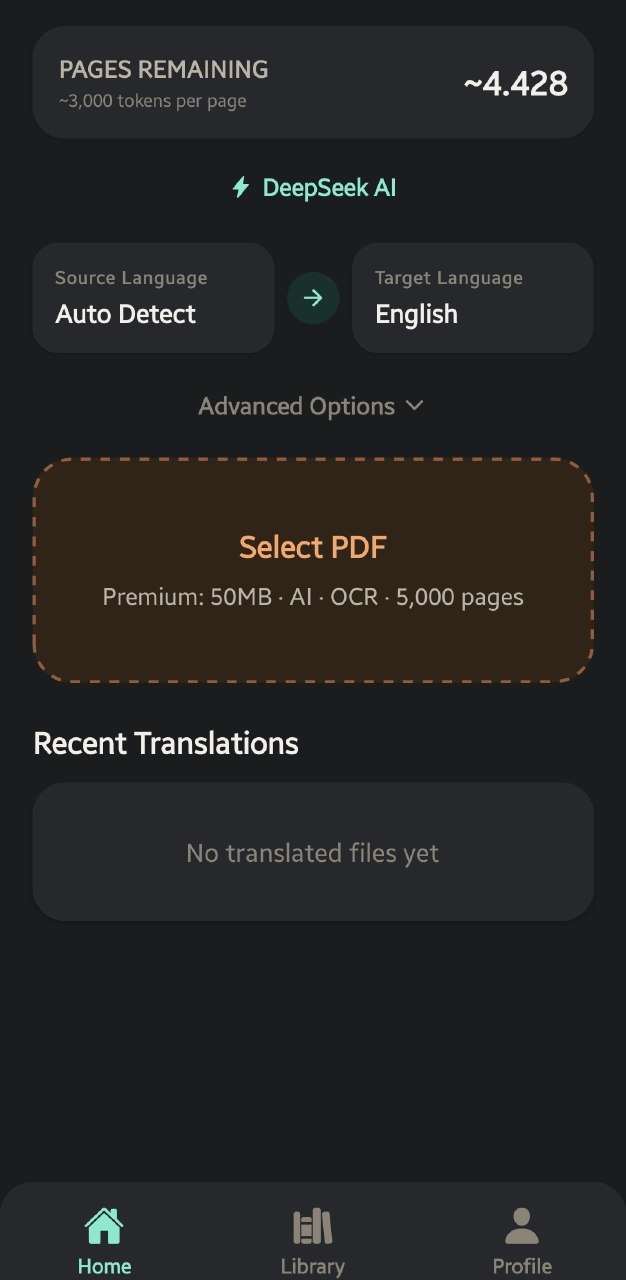
Docuvey AI PDF Translator — Android App Screenshot showing PDF translation with preserved layout
150+
Translation Languages
3
Max Concurrent Jobs
99%
Layout Retention Rate
The most advanced AI PDF translator — free & pro
Built specifically for PDF translation. Every feature engineered to keep your document looking exactly like the original while translating to 150+ languages with AI precision.

DeepSeek AI Translation Engine

Our AI PDF translator uses DeepSeek's advanced language model for the best quality results. Preserves context, tone, and nuance for natural, professional document translation. Available on Pro & Max plans.

Free PDF Translation — Standard

Fast, reliable, and completely free to translate PDF files. Docuvey handles all PDF parsing, typesetting, and layout — you get a perfectly formatted translated PDF every time at zero cost.

OCR for Scanned PDF Translation

Toggle OCR on to translate scanned PDF documents and image-based files. Our AI extracts text from scans, translates it, and rebuilds the layout. Available on Pro & Max plans.

Priority Queue Processing

Pro & Max users get priority in the translation queue — your PDF translation jobs skip ahead. Free users wait in line. Max 3 concurrent translations with fair scheduling for all.

Layout & Formatting Preservation

Unlike other PDF translators, Docuvey handles PDF parsing, typesetting, fonts, and page structure in-house. Charts, images, and tables stay exactly in place — only the text changes. Translate PDF without losing formatting.

150+ Languages for Document Translation

Translate PDF from and to English, Spanish, Chinese, Japanese, Russian, Arabic, Azerbaijani — over 150 target languages with native-level fluency. Free and Pro plans share the same language selection.

Translate PDF files in 3 simple steps
Upload any PDF document, pick your target language, and get a professionally translated PDF back — layout intact. Free PDF translation for everyone.
1

Upload Your PDF Document

Pick any PDF from your device — scanned or digital. Free PDF translator supports up to 5 MB, 160 pages. Pro: 50 MB, Max: 100 MB, up to 5,000 pages per file.

2

Choose Target Language

Select from 150+ languages for translation. Your plan auto-selects the best translation engine — Standard (free) or DeepSeek AI (Pro/Max). Toggle OCR to translate scanned PDFs.

3

Download Your Translated PDF

Your AI-translated PDF is ready in minutes — layout preserved, design intact, only the language changed. Download, open, or share your translated document directly.

Free PDF translator with pro AI options
Start translating PDFs for free. Upgrade to Pro or Max for DeepSeek AI translation, OCR, faster processing, and more pages.
Free
$0/month

Standard translation for casual use

  • Standard translation engine
  • 160 pages per file
  • Max 5 MB file size
  • 150+ languages
  • Layout preservation
  • Bilingual dual mode
Get Started Free
Max
$19.99/month

Maximum speed & capacity

  • Everything in Pro
  • Faster processing
  • Advanced OCR quality
  • 5,000 pages per file
  • Max 100 MB file size
  • ~25,000 pages per month
Subscribe on Google Play

Ready to translate PDF files for free?

Download the #1 AI PDF translator app on Android. Free PDF translation for everyone — no credit card required. Upgrade to Pro or Max for DeepSeek AI, OCR, and faster processing. Start translating PDF documents now.

AI PDF Translator — Frequently Asked Questions
Is Docuvey free? +

Yes! Docuvey has a free plan with Standard translation for everyone. Free users get up to 160 pages per PDF, 5 MB file size. Pro ($9.99/month) unlocks DeepSeek AI translation, OCR toggle, ~8,000 pages/month, and priority processing. Max ($19.99/month) adds faster processing, ~25,000 pages/month, and 100 MB files.

What's the difference between Standard and DeepSeek AI PDF translation? +

Both preserve your PDF layout — Docuvey handles all formatting in-house. The difference is translation quality: Standard is fast, reliable, and completely free. DeepSeek AI translation uses an advanced language model for context-aware, natural-sounding results — better for professional document translation, technical PDFs, or nuanced content.

Does the AI PDF translator preserve the original layout? +

Yes — that's what makes Docuvey different from other PDF translators. We handle all layout work ourselves: Docuvey parses your PDF, extracts the text, sends it for translation, then places the translated text back into the original layout with matching fonts and positioning. Charts, images, tables, and formatting stay exactly where they were.

How does page and token consumption work? +

Pro ($9.99/mo) includes roughly 8,000 pages per month. Max ($19.99/mo) includes roughly 25,000 pages per month. Actual consumption depends on text density: pages with dense or small text count more, pages with sparse text count less. The system tracks actual usage so you get a fair deal — light documents stretch your quota further, dense documents use more of it.

Can I translate scanned PDF documents with OCR? +

Yes! Pro and Max plans include an OCR toggle for scanned or image-based PDFs. Simply enable OCR before uploading and Docuvey will extract text from scans and translate with AI. Available on Pro ($9.99) and Max ($19.99) plans.

Are my documents safe? +

Yes. Documents are processed and immediately deleted from our servers after translation. We do not store, share, scan, or train on your PDFs. Your content stays yours.

Which platforms are supported? +

Docuvey is available on Android (requires Android 8.0+). iOS support is coming soon.